Turn all websites into apps
Multi-tasking is a very efficient way of getting things done quickly, but sometimes, the programs you have are just not up to par. For example, web browsers may experience lags and slow-downs when users open too many tabs. Not only that, people would have to go through the trouble of inputting addresses manually when they are trying to access certain websites and services. Needless to say, this is a very inefficient way of working. Fortunately, Horbito’s NOVA browser has a possible solution to your multi-tasking and productivity needs.
Top Recommended Alternative

What is NOVA?
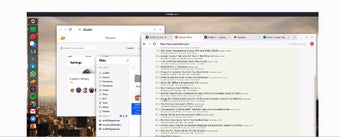
NOVA is a web browser with a unique selling feature. It aggregates all of a user’s apps into one easy-to-access browser. This allows users to access favorite apps quickly without having to install a bunch of apps. The apps are displayed as icons and they can be found at the left-hand side of the browser window. Clicking on the icon will open a new window instead of a new tab.
Easy and Innovative
What’s great about NOVA is that it completely eliminates the need to access websites manually. Not every website has a dedicated app, and some of them that do are only available on mobile platforms. NOVA turns any website into an app by making them accessible through a single click of an icon. Since you’re just opening a new window, all of the features you’d expect from the full desktop website.
If there is an issue with NOVA to gripe about, it’s probably the limited extension support. Obviously, it doesn’t have the same range of extensions that Chrome and Firefox have accumulated over the years. It also doesn’t have the same features as these old browsers did, but beyond that, NOVA’s a great choice among browsers.
Worth a Shot
If nothing else, NOVA provides users with a more efficient way of accessing their favorite websites. It may not be as powerful or feature-rich as Chrome or Firefox, but it does it's job well for increasing the productivity of it's users. It’s worth a shot for anyone who likes to multitask.